# Administration


# Benutzer- und Rechteverwaltung

## Anlegen eines P!-Benutzers mit dazugehörigen Rechten

### <span style="mso-fareast-font-family: Calibri; mso-fareast-theme-font: minor-latin;"><span style="mso-list: Ignore;"><span style="font: 7.0pt 'Times New Roman';"> </span></span></span>Vorbereitung

<span style="mso-bidi-font-size: 11.0pt; mso-fareast-font-family: 'Times New Roman'; mso-bidi-font-family: 'Times New Roman';">Als Vorbereitung sollte die betreffen Person in P! als Person angelegt sein mit den dazugehörigen Kontaktinformationen und mit Eintrittsdatum in den entsprechenden Betrieb.</span>

<span style="mso-bidi-font-size: 11.0pt; mso-fareast-font-family: 'Times New Roman'; mso-bidi-font-family: 'Times New Roman';"> </span>

### Benutzer anlegen

<span style="mso-bidi-font-size: 11.0pt; mso-fareast-font-family: 'Times New Roman'; mso-bidi-font-family: 'Times New Roman';">In der Administration im Reiter „Rechte“ in der Tabelle „Benutzer“ – rechte Maustaste</span>

<span style="mso-bidi-font-size: 11.0pt; mso-fareast-font-family: 'Times New Roman'; mso-bidi-font-family: 'Times New Roman';"> </span><span style="mso-bidi-font-size: 11.0pt; mso-fareast-font-family: 'Times New Roman'; mso-bidi-font-family: 'Times New Roman';">Mit „Neuer Eintrag“ folgende Felder ausfüllen:</span>

[![grafik.png](https://docs.alpha-np.de/uploads/images/gallery/2025-07/scaled-1680-/Yb1grafik.png)](https://docs.alpha-np.de/uploads/images/gallery/2025-07/Yb1grafik.png)

<span style="mso-bidi-font-size: 11.0pt; mso-fareast-font-family: 'Times New Roman'; mso-bidi-font-family: 'Times New Roman'; mso-no-proof: yes;"> </span>

- <span style="mso-bidi-font-size: 11.0pt; line-height: 107%; mso-fareast-font-family: 'Times New Roman'; mso-bidi-font-family: 'Times New Roman';">**Name:** Der Benutzername so wie er auch in der WindowsAD gebraucht wird. Mit diesem Namen wird sich der Nutzer auch in Zukunft anmelden.</span>
- <span style="mso-bidi-font-size: 11.0pt; line-height: 107%; mso-fareast-font-family: 'Times New Roman'; mso-bidi-font-family: 'Times New Roman';">**Passwort:** Setzen Sie ein Passwort, dies sollte nach dem ersten Login vom Benutzer selbst geändert werden. Standardmäßig wird von uns jedem Benutzer eine Leerstelle als Passwort gegeben.</span>
- <span style="mso-bidi-font-size: 11.0pt; line-height: 107%; mso-fareast-font-family: 'Times New Roman'; mso-bidi-font-family: 'Times New Roman';">**IstAktiv:** Haken muss gesetzt werden, so dass der Benutzer aktiv ist und Zugriff auf P!5 hat</span>
- <span style="mso-bidi-font-size: 11.0pt; line-height: 107%; mso-fareast-font-family: 'Times New Roman'; mso-bidi-font-family: 'Times New Roman';">*P4Rechte:* Bleibt leer</span>
- <span style="mso-bidi-font-size: 11.0pt; line-height: 107%; mso-fareast-font-family: 'Times New Roman'; mso-bidi-font-family: 'Times New Roman';">**Person\_ID:** Suchen Sie hier bitte die von Ihnen angelegt Person</span>
- <span style="mso-bidi-font-size: 11.0pt; line-height: 107%; mso-fareast-font-family: 'Times New Roman'; mso-bidi-font-family: 'Times New Roman';">*Impersonate\_ID:* Bleibt leer.</span>
- <span style="mso-bidi-font-size: 11.0pt; line-height: 107%; mso-fareast-font-family: 'Times New Roman'; mso-bidi-font-family: 'Times New Roman';">**Default\_Institution\_ID:** Wählen Sie die Institution aus</span>
- <span style="mso-bidi-font-size: 11.0pt; line-height: 107%; mso-fareast-font-family: 'Times New Roman'; mso-bidi-font-family: 'Times New Roman';">**Default\_Sprache\_IDX:** Deutsch (Englisch steht zur Zeit noch nicht zur Verfügung)</span>

### Rechte zuweisen

<span style="mso-bidi-font-size: 11.0pt; mso-fareast-font-family: 'Times New Roman'; mso-bidi-font-family: 'Times New Roman';">Damit der Nutzer überhaupt was tun darf, müssen Rechte zugewiesen werden. </span>

#### Durch Übertragung der Rechte

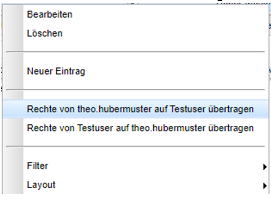
<span style="mso-bidi-font-size: 11.0pt; mso-fareast-font-family: 'Times New Roman'; mso-bidi-font-family: 'Times New Roman';">Am leichtesten lassen sich diese durch den Testuser übertragen. Hier wird der bereits vorhandene Testuser als Zwischenablage genutzt, um Rechte von einem Nutzer auf den anderen zu übertragen.</span>

- <span style="mso-bidi-font-size: 11.0pt; line-height: 107%; mso-fareast-font-family: 'Times New Roman'; mso-bidi-font-family: 'Times New Roman';">Rechtsklick auf den Benutzer, dessen Rechte man kopieren möchte:</span>

<span style="mso-bidi-font-size: 11.0pt; line-height: 107%; mso-fareast-font-family: 'Times New Roman'; mso-bidi-font-family: 'Times New Roman';">Rechte von XXX auf testuser übertragen</span>

[![grafik.png](https://docs.alpha-np.de/uploads/images/gallery/2025-07/scaled-1680-/XS2grafik.png)](https://docs.alpha-np.de/uploads/images/gallery/2025-07/XS2grafik.png)

<span style="mso-bidi-font-size: 11.0pt; line-height: 107%; mso-fareast-font-family: 'Times New Roman'; mso-bidi-font-family: 'Times New Roman'; mso-no-proof: yes;"> </span>

- <span style="mso-bidi-font-size: 11.0pt; line-height: 107%; mso-fareast-font-family: 'Times New Roman'; mso-bidi-font-family: 'Times New Roman';">Danach Rechtsklick auf den neuen Nutzer, (oder wo entsprechend Rechte geändert werden müssen) -&gt; Rechte von Testuser auf XXX übertragen</span>

<span style="mso-bidi-font-size: 11.0pt; mso-fareast-font-family: 'Times New Roman'; mso-bidi-font-family: 'Times New Roman';">Im Anschluss haben beide Benutzer die selben Rechte.</span>

<span style="mso-bidi-font-size: 11.0pt; mso-fareast-font-family: 'Times New Roman'; mso-bidi-font-family: 'Times New Roman';"> </span><span style="mso-bidi-font-size: 11.0pt; mso-fareast-font-family: 'Times New Roman'; mso-bidi-font-family: 'Times New Roman';">Der Testuser kann in anderen Fällen auch verwendet werden um zu überprüfen ob die gewünschte Rechteeinstellung auch so umgesetzt wurde. Hierfür können sie sich mit dem Benutzernamen „Testuser“ anmelden. Das Passwort können Sie in der Administration ebenfalls selbst anpassen.</span>

<span style="mso-bidi-font-size: 11.0pt; mso-fareast-font-family: 'Times New Roman'; mso-bidi-font-family: 'Times New Roman';"> </span>

#### Durch das Verwenden von Standardeinstellungen

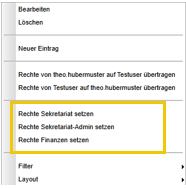
<span style="mso-bidi-font-size: 11.0pt; mso-fareast-font-family: 'Times New Roman'; mso-bidi-font-family: 'Times New Roman';">Es gibt drei vorgefertigte Standards (Sekretariat, Sekreatriat Admin und Finanzen) mit denen die Rechte für Sekretariat und Beitragsverwaltung/ Finanzen gesetzt werden können. Bei Bedarf können anschließend Gruppen bearbeitet werden oder Rechte wieder herausgenommen werde.</span>

<span style="mso-bidi-font-size: 11.0pt; mso-fareast-font-family: 'Times New Roman'; mso-bidi-font-family: 'Times New Roman';"> </span><span style="mso-bidi-font-size: 11.0pt; mso-fareast-font-family: 'Times New Roman'; mso-bidi-font-family: 'Times New Roman';">Dazu gehen Sie mit der Rechten Maustaste auf den entsprechenden Benutzer und wählen entweder „Rechte Sekretariat setzen“, „Rechte Sekretariat-Admin setzen“ oder „Rechte Finanzen setzen“ aus.</span>

<span style="mso-bidi-font-size: 11.0pt; mso-fareast-font-family: 'Times New Roman'; mso-bidi-font-family: 'Times New Roman'; mso-no-proof: yes;"> </span>

[![grafik.png](https://docs.alpha-np.de/uploads/images/gallery/2025-07/scaled-1680-/49xgrafik.png)](https://docs.alpha-np.de/uploads/images/gallery/2025-07/49xgrafik.png)

#### Durch Verwendung der Stellenprofile im Bereich Zuständigkeiten

<span style="mso-bidi-font-size: 11.0pt; mso-fareast-font-family: 'Times New Roman'; mso-bidi-font-family: 'Times New Roman';">Es sind einige Stellenprofile eingerichtet, die unterschiedliche Szenarien abbilden. Dies soll Ihnen durch sinnvolle Vorkonfigurationen die Einrichtung der Rechte erleichtern. Ein Stellenprofil richtet sich immer an einer von Ihnen zugeordneten Gruppe. Das kann auf höchster Ebene die Zentrale oder Institution sein, es kann aber auch nur eine Gruppe oder Einrichtung sein.</span>

<span style="mso-bidi-font-size: 11.0pt; mso-fareast-font-family: 'Times New Roman'; mso-bidi-font-family: 'Times New Roman';"> </span><span style="mso-bidi-font-size: 11.0pt; mso-fareast-font-family: 'Times New Roman'; mso-bidi-font-family: 'Times New Roman';">Das Stellenprofil definiert in erster Linie welche Knöpfe im Homebereich und welche Reiter in der Person oder der Gruppe zu sehen sind.</span>

<span style="mso-bidi-font-size: 11.0pt; mso-fareast-font-family: 'Times New Roman'; mso-bidi-font-family: 'Times New Roman';">Hier ein kleiner Überblick über die wichtigsten Stellenprofile:</span>

- <span style="mso-bidi-font-size: 11.0pt; line-height: 107%; mso-fareast-font-family: 'Times New Roman'; mso-bidi-font-family: 'Times New Roman';">Administrator</span>
- <span style="mso-bidi-font-size: 11.0pt; line-height: 107%; mso-fareast-font-family: 'Times New Roman'; mso-bidi-font-family: 'Times New Roman';">Darf in der Gruppenverwaltung Felder anlegen/ sehen</span>
- <span style="mso-bidi-font-size: 11.0pt; line-height: 107%; mso-fareast-font-family: 'Times New Roman'; mso-bidi-font-family: 'Times New Roman';">Sieht in der Administration alle Bereich</span>
- <span style="mso-bidi-font-size: 11.0pt; line-height: 107%; mso-fareast-font-family: 'Times New Roman'; mso-bidi-font-family: 'Times New Roman';">Administrationsrechte können nicht auf Gruppen beschränkt werden</span>
- <span style="mso-bidi-font-size: 11.0pt; line-height: 107%; mso-fareast-font-family: 'Times New Roman'; mso-bidi-font-family: 'Times New Roman';">Ein reines Leserecht ist aber möglich</span>
- <span style="mso-bidi-font-size: 11.0pt; line-height: 107%; mso-fareast-font-family: 'Times New Roman'; mso-bidi-font-family: 'Times New Roman';">ACHTUNG: Administrationsrechte sollten nicht ohne entsprechende Einweisung vergeben werden. </span>

- <span style="mso-bidi-font-size: 11.0pt; line-height: 107%; mso-fareast-font-family: 'Times New Roman'; mso-bidi-font-family: 'Times New Roman';">Finanzen</span>
- <span style="mso-bidi-font-size: 11.0pt; line-height: 107%; mso-fareast-font-family: 'Times New Roman'; mso-bidi-font-family: 'Times New Roman';">Sieht im Homebereich den Knopf Finanzen</span>
- <span style="mso-bidi-font-size: 11.0pt; line-height: 107%; mso-fareast-font-family: 'Times New Roman'; mso-bidi-font-family: 'Times New Roman';">Darf alle Beitragsinformationen sehen und bearbeiten (soweit nicht eingeschränkt)</span>
- <span style="mso-bidi-font-size: 11.0pt; line-height: 107%; mso-fareast-font-family: 'Times New Roman'; mso-bidi-font-family: 'Times New Roman';">In der Regel ist es sinnvoll, Personen die mit Beiträgen arbeiten zusätzlich das Stellenprofile „Verwaltung“ zuzuordnen. Falls Ansichten der Gruppenverwaltung gewünscht sind, muss dies ebenfalls zusätzlich eingerichtet werden.</span>


- <span style="mso-bidi-font-size: 11.0pt; line-height: 107%; mso-fareast-font-family: 'Times New Roman'; mso-bidi-font-family: 'Times New Roman';">Verwaltung</span>
    - <span style="mso-bidi-font-size: 11.0pt; line-height: 107%; mso-fareast-font-family: 'Times New Roman'; mso-bidi-font-family: 'Times New Roman';">Sieht im Homebereich die Knöpfe Wiedervorlage, Abwesenheiten und Personen</span>
    - <span style="mso-bidi-font-size: 11.0pt; line-height: 107%; mso-fareast-font-family: 'Times New Roman'; mso-bidi-font-family: 'Times New Roman';">Darf bei Personen und Familienmitgliedern Änderungen sehen und vornehmen</span>
    - <span style="mso-bidi-font-size: 11.0pt; line-height: 107%; mso-fareast-font-family: 'Times New Roman'; mso-bidi-font-family: 'Times New Roman';">Implementiert ist KEINE Gruppenverwaltung. Hier sollte in der Regel mindesten ein weiteres Stellenprofil (Klassen, Kinderbetreuung, Mitarbeiter, Personengruppen) eingerichtet werden</span>
- <span style="mso-fareast-font-family: 'Times New Roman'; mso-bidi-font-family: 'Times New Roman';">Admin-Verwaltung</span>
    - Ist als Zusatzrecht für Verwaltungskräfte (i.d.R. Sekretariat) sinnvoll
    - Aus dem Administrativen Bereich stehen die Rechte für folgende Funktionen in der Gruppenverwaltung oder Administration zu Verfügung: Erstellung von Felder, Anpassung von Einstellungen für Gruppen, Anpassungen/ Erstellungen ExportSpec, Anpassungen der Lookup-Tabelle
    - Jegliche Anpassungen zu Benutzern oder Rechten ist hier nicht enthalten.

- <span style="mso-bidi-font-size: 11.0pt; line-height: 107%; mso-fareast-font-family: 'Times New Roman'; mso-bidi-font-family: 'Times New Roman';">Klassen/ Kinderbetreuung/ Mitarbeiter/ Personengruppen/ Gesamtübersicht</span>
    - <span style="mso-bidi-font-size: 11.0pt; line-height: 107%; mso-fareast-font-family: 'Times New Roman'; mso-bidi-font-family: 'Times New Roman';">Sieht im Homebereich den Knopf Gruppenverwaltung</span>
    - <span style="mso-bidi-font-size: 11.0pt; line-height: 107%; mso-fareast-font-family: 'Times New Roman'; mso-bidi-font-family: 'Times New Roman';">Je nach ausgewählten Bereichen, sieht man entsprechend einen oder mehrere der Reiter „Klassen“, „Betreuungsgruppen“, „Betriebe“ oder „Personengruppen“. </span>
    - <span style="mso-bidi-font-size: 11.0pt; line-height: 107%; mso-fareast-font-family: 'Times New Roman'; mso-bidi-font-family: 'Times New Roman';">Die Gesamtübersicht muss bei Bedarf zusätzlich als Recht eingerichtet werden.</span>
    - <span style="mso-bidi-font-size: 11.0pt; line-height: 107%; mso-fareast-font-family: 'Times New Roman'; mso-bidi-font-family: 'Times New Roman';">Falls das Profil „Verwaltung“ nicht zusätzlich gewählt ist, kann nicht auf die Person gesprungen werden.</span>
    - <span style="mso-bidi-font-size: 11.0pt; line-height: 107%; mso-fareast-font-family: 'Times New Roman'; mso-bidi-font-family: 'Times New Roman';">Änderung können in der Gruppenverwaltung vorgenommen werden (soweit nicht eingeschränkt</span>
    - <span style="mso-bidi-font-size: 11.0pt; line-height: 107%; mso-fareast-font-family: 'Times New Roman'; mso-bidi-font-family: 'Times New Roman';">Alle möglichen Exporten, Listen und Mails können verwendet werden</span>
- <span style="mso-bidi-font-size: 11.0pt; line-height: 107%; mso-fareast-font-family: 'Times New Roman'; mso-bidi-font-family: 'Times New Roman';">Klassenlehrer mit Rechten/ Erzieher</span>
    - <span style="mso-bidi-font-size: 11.0pt; line-height: 107%; mso-fareast-font-family: 'Times New Roman'; mso-bidi-font-family: 'Times New Roman';">Sieht im Homebereich den Knopf „Gruppenverwaltung“</span>
    - <span style="mso-bidi-font-size: 11.0pt; line-height: 107%; mso-fareast-font-family: 'Times New Roman'; mso-bidi-font-family: 'Times New Roman';">Änderung können in der Klasse/ Kinderbetreuungsgruppe vorgenommen werden (soweit nicht eingeschränkt)</span>
    - <span style="mso-bidi-font-size: 11.0pt; line-height: 107%; mso-fareast-font-family: 'Times New Roman'; mso-bidi-font-family: 'Times New Roman';">Alle möglichen Exporten, Listen und Mails können verwendet werden</span>
    - <span style="mso-bidi-font-size: 11.0pt; line-height: 107%; mso-fareast-font-family: 'Times New Roman'; mso-bidi-font-family: 'Times New Roman';">Einrichtung läuft in der Regel über „Zuständigkeiten“ (s. </span><span style="mso-bidi-font-size: 11.0pt; line-height: 107%; mso-fareast-font-family: 'Times New Roman'; mso-bidi-font-family: 'Times New Roman';">0</span><span style="mso-bidi-font-size: 11.0pt; line-height: 107%; mso-fareast-font-family: 'Times New Roman'; mso-bidi-font-family: 'Times New Roman';">)</span>

<span style="mso-bidi-font-size: 11.0pt; mso-fareast-font-family: 'Times New Roman'; mso-bidi-font-family: 'Times New Roman';">Neben dem Stellenprofil sind folgende Angaben wichtig</span>

- <span style="mso-bidi-font-size: 11.0pt; line-height: 107%; mso-fareast-font-family: 'Times New Roman'; mso-bidi-font-family: 'Times New Roman';">Haken „Ist Aktiv“ – bedeutet dass das Recht aktiv verwendet werden soll. Man kann Rechte so zwischenzeitlich ausschalten.</span>
- <span style="mso-bidi-font-size: 11.0pt; line-height: 107%; mso-fareast-font-family: 'Times New Roman'; mso-bidi-font-family: 'Times New Roman';">Zuständiger – füllt sich automatisch mit dem Namen der Person, bei dem die Rechteanpassung vorgenommen werden</span>
- <span style="mso-bidi-font-size: 11.0pt; line-height: 107%; mso-fareast-font-family: 'Times New Roman'; mso-bidi-font-family: 'Times New Roman';">Gruppe – alle Gruppen, die in dieser enthalten sind, erhalten die gleichen Rechte</span>
- <span style="mso-bidi-font-size: 11.0pt; line-height: 107%; mso-fareast-font-family: 'Times New Roman'; mso-bidi-font-family: 'Times New Roman';">Stellenprofil – s. oben</span>
- <span style="mso-bidi-font-size: 11.0pt; line-height: 107%; mso-fareast-font-family: 'Times New Roman'; mso-bidi-font-family: 'Times New Roman';">Unternummer – füllt sich automatisch</span>
- <span style="mso-bidi-font-size: 11.0pt; line-height: 107%; mso-fareast-font-family: 'Times New Roman'; mso-bidi-font-family: 'Times New Roman';">Schreibgeschützt – wenn der Haken gesetzt ist, kann der Nutzer das Recht nur lesend verwenden. Änderung sind nicht möglich.</span>

#### <span style="mso-bookmark: _Ref156322303;">Durch Verwendung von Zuständigkeiten</span>

<span style="mso-bidi-font-size: 11.0pt; mso-fareast-font-family: 'Times New Roman'; mso-bidi-font-family: 'Times New Roman';">In der Gruppenverwaltung können Zuständigkeiten gepflegt werden. Zum Beispiel Klassenlehrer mit Rechten. Soweit der betreffende Nutzer angelegt ist, spiegelt sich die Eingabe der Zuständigkeit direkt auf die Benutzerverwaltung in der Administration.</span>

<span style="mso-bidi-font-size: 11.0pt; mso-fareast-font-family: 'Times New Roman'; mso-bidi-font-family: 'Times New Roman';"> </span>

### Benutzer löschen/ deaktivieren

<span style="mso-bidi-font-size: 11.0pt; mso-fareast-font-family: 'Times New Roman'; mso-bidi-font-family: 'Times New Roman';">Sollte das Benutzerkonto nicht mehr gebraucht werden, durch den Wechsel der Tätigkeit oder durch Austritt, können Sie den Benutzer löschen oder deaktivieren. Grundsätzlich wird immer eine Deaktivierung empfohlen.</span>

<span style="mso-bidi-font-size: 11.0pt; mso-fareast-font-family: 'Times New Roman'; mso-bidi-font-family: 'Times New Roman';"> </span>

#### Deaktivieren

<span style="mso-bidi-font-size: 11.0pt; mso-fareast-font-family: 'Times New Roman'; mso-bidi-font-family: 'Times New Roman';">Es empfiehlt sich in jedem Fall in erster Linie eine Deaktivierung. Dadurch ist ein einloggen mit den Benutzerdaten nicht mehr möglich, die dahinter liegenden Informationen bleiben aber erhalten und könnten auch wieder reaktiviert werden.</span>

<span style="mso-bidi-font-size: 11.0pt; mso-fareast-font-family: 'Times New Roman'; mso-bidi-font-family: 'Times New Roman';">Dafür nehmen Sie in der Administration – Rechte – Benutzer den Haken „IstAktiv“ beim entsprechenden Nutzer raus</span>

<span style="mso-bidi-font-size: 11.0pt; mso-fareast-font-family: 'Times New Roman'; mso-bidi-font-family: 'Times New Roman'; mso-no-proof: yes;"> </span>

<span style="mso-bidi-font-size: 11.0pt; mso-fareast-font-family: 'Times New Roman'; mso-bidi-font-family: 'Times New Roman';"> </span>[![grafik.png](https://docs.alpha-np.de/uploads/images/gallery/2025-07/scaled-1680-/W20grafik.png)](https://docs.alpha-np.de/uploads/images/gallery/2025-07/W20grafik.png)

#### Löschen

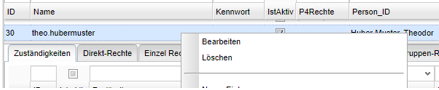
<span style="mso-bidi-font-size: 11.0pt; mso-fareast-font-family: 'Times New Roman'; mso-bidi-font-family: 'Times New Roman';">Löschen kann man den Nutzer an der gleichen Stelle mit Rechter Maustaste auf den entsprechenden Benutzer:</span>

[![grafik.png](https://docs.alpha-np.de/uploads/images/gallery/2025-07/scaled-1680-/7afgrafik.png)](https://docs.alpha-np.de/uploads/images/gallery/2025-07/7afgrafik.png)

<span style="mso-bidi-font-size: 11.0pt; mso-fareast-font-family: 'Times New Roman'; mso-bidi-font-family: 'Times New Roman'; mso-no-proof: yes;"> </span>

<span style="mso-bidi-font-size: 11.0pt; mso-fareast-font-family: 'Times New Roman'; mso-bidi-font-family: 'Times New Roman';">Im Anschluss sind alle benutzerspezifischen Informationen (Bsp: Layouts, Farbe, Passwort,etc) gelöscht. Eingegebene Daten und Änderungen in P!5 bleiben selbstverständlich erhalten, jedoch ist die Zuordnung zum Benutzer nicht mehr möglich, an der Oberfläche wird nur noch eine ID dargestellt.</span>

<span style="mso-bidi-font-size: 11.0pt; mso-fareast-font-family: 'Times New Roman'; mso-bidi-font-family: 'Times New Roman';"></span>

# Anlegen und verwalten eines UDF (Individuellen Feldes)

### <span style="mso-fareast-font-family: Calibri; mso-fareast-theme-font: minor-latin;"><span style="mso-list: Ignore;"><span style="font: 7.0pt 'Times New Roman';"> </span></span></span>Anlegen eines UDFs

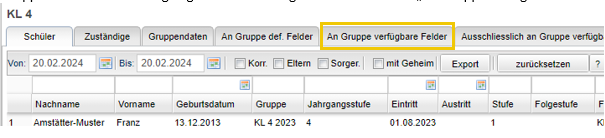
<span style="mso-bidi-font-size: 11.0pt; mso-fareast-font-family: 'Times New Roman'; mso-bidi-font-family: 'Times New Roman';">Das Anlegen eines individuellen Feldes ist über die Gruppenverwaltung möglich. Dafür wählen Sie eine Gruppe aus dem für Sie festgelegten Bereich und gehen auf den Reiten „An Gruppe verfügbare Felder“:</span><span style="mso-bidi-font-size: 11.0pt; mso-fareast-font-family: 'Times New Roman'; mso-bidi-font-family: 'Times New Roman'; mso-fareast-language: DE; mso-no-proof: yes;"> </span>

<span style="mso-bidi-font-size: 11.0pt; mso-fareast-font-family: 'Times New Roman'; mso-bidi-font-family: 'Times New Roman'; mso-no-proof: yes;"> </span><span style="mso-bidi-font-size: 11.0pt; mso-fareast-font-family: 'Times New Roman'; mso-bidi-font-family: 'Times New Roman';"><span style="mso-spacerun: yes;"> </span></span>

[![grafik.png](https://docs.alpha-np.de/uploads/images/gallery/2025-07/scaled-1680-/Kqfgrafik.png)](https://docs.alpha-np.de/uploads/images/gallery/2025-07/Kqfgrafik.png)

<span style="mso-bidi-font-size: 11.0pt; mso-fareast-font-family: 'Times New Roman'; mso-bidi-font-family: 'Times New Roman';"> </span>

<span style="mso-bidi-font-size: 11.0pt; mso-fareast-font-family: 'Times New Roman'; mso-bidi-font-family: 'Times New Roman';">Hier sehen Sie nun alle Felder, die für diese Gruppe verfügbar sind:</span>

<span style="mso-bidi-font-size: 11.0pt; mso-fareast-font-family: 'Times New Roman'; mso-bidi-font-family: 'Times New Roman'; mso-no-proof: yes;"> </span>

<span style="mso-bidi-font-size: 11.0pt; mso-fareast-font-family: 'Times New Roman'; mso-bidi-font-family: 'Times New Roman';"> </span>

[![grafik.png](https://docs.alpha-np.de/uploads/images/gallery/2025-07/scaled-1680-/t2igrafik.png)](https://docs.alpha-np.de/uploads/images/gallery/2025-07/t2igrafik.png)

<span style="mso-bidi-font-size: 11.0pt; mso-fareast-font-family: 'Times New Roman'; mso-bidi-font-family: 'Times New Roman';">Und können über das Kontextmenü (rechte Maustaste -&gt; Neuer Eintrag) ein neues Feld erstellen. Dafür sind folgende Einstellungen vorzunehmen:</span>

<span style="mso-bidi-font-size: 11.0pt; mso-fareast-font-family: 'Times New Roman'; mso-bidi-font-family: 'Times New Roman';"> </span>

**Feldname**

<span style="mso-bidi-font-size: 11.0pt; mso-fareast-font-family: 'Times New Roman'; mso-bidi-font-family: 'Times New Roman';">Hier können Sie einen beliebigen Feldnamen wählen. Dabei sind keine Umlaute oder Sonderzeichen (außer \_ und -) zulässig. Zu beachten ist zusätzlich die alphabethische Sortierung in der späteren Verwendung von zum Bespiel Spaltenlayouts in der Gruppenverwaltung. So ist es sinnvoll, Felder die in Regel zusammen verwendet werden sollen ein Anfangskürzel zu geben.</span>

<span style="mso-bidi-font-size: 11.0pt; mso-fareast-font-family: 'Times New Roman'; mso-bidi-font-family: 'Times New Roman';"> </span>

**Feldtyp**

<span style="mso-bidi-font-size: 11.0pt; mso-fareast-font-family: 'Times New Roman'; mso-bidi-font-family: 'Times New Roman';">Hier legen Sie die Feldtyp fest. Empfehlenswert sind die Feldtypen „Text“, „Datum“ und „JaNein“. </span>

<span style="mso-bidi-font-size: 11.0pt; mso-fareast-font-family: 'Times New Roman'; mso-bidi-font-family: 'Times New Roman';"> </span>

**Definiert an Gruppe**

<span style="mso-bidi-font-size: 11.0pt; mso-fareast-font-family: 'Times New Roman'; mso-bidi-font-family: 'Times New Roman';">Ab welcher Gruppen soll ihr Feld verfügbar sein? Felder, die für Klassen und Betreuungsgruppen angelegt werden, ist es sinnvoll immer auf der Ebene „E Einrichtungen“ zu verorten, da man sonst das Felder nur in der speziellen Einrichtung sieht (Bsp Klassen).</span>

<span style="mso-bidi-font-size: 11.0pt; mso-fareast-font-family: 'Times New Roman'; mso-bidi-font-family: 'Times New Roman';">Felder für das Personal verwenden Sie in der Regel „B Betriebe“ als Gruppe aus. </span>

<span style="mso-bidi-font-size: 11.0pt; mso-fareast-font-family: 'Times New Roman'; mso-bidi-font-family: 'Times New Roman';"> </span>

<span style="mso-bidi-font-size: 11.0pt; mso-fareast-font-family: 'Times New Roman'; mso-bidi-font-family: 'Times New Roman';">Theoretisch kann auch für eine sehr spezielle Gruppe Bsp „8. Klasse 2023/2024“ das Feld erstellt werden. Das Feld ist dann nur in dieser Gruppe sichtbar und anpassbar.</span>

<span style="mso-bidi-font-size: 11.0pt; mso-fareast-font-family: 'Times New Roman'; mso-bidi-font-family: 'Times New Roman';"> </span>

<span style="mso-bidi-font-size: 11.0pt; mso-fareast-font-family: 'Times New Roman'; mso-bidi-font-family: 'Times New Roman';">Die übergeordneten Gruppen „Z Zentrale“ und „I Institutionen“ sind in der Regel nur bei Stammdaten zu verwenden und in der Regel nicht empfehlenswert.</span>

<span style="mso-bidi-font-size: 11.0pt; mso-fareast-font-family: 'Times New Roman'; mso-bidi-font-family: 'Times New Roman';"> </span>

**Definiert für Gruppenbasistyp**

<span style="mso-bidi-font-size: 11.0pt; mso-fareast-font-family: 'Times New Roman'; mso-bidi-font-family: 'Times New Roman';">Über den Gruppenbasistyp kann festgelegt werden, ob Daten eine Historie haben sollen. Wenn dies der Fall sein soll, dann ist je nach Nutzung entweder „Klasse“ oder „Betreuungsgruppe“ zu wählen. Sollte keine Historie in den Daten sichtbar sein sollen, dann hält man sich in der Zuordnung an die gewählte Gruppe.</span>

<span style="mso-bidi-font-size: 11.0pt; mso-fareast-font-family: 'Times New Roman'; mso-bidi-font-family: 'Times New Roman';"> </span>

<span style="mso-bidi-font-size: 11.0pt; mso-fareast-font-family: 'Times New Roman'; mso-bidi-font-family: 'Times New Roman';">Beispiel1: Masernvorlage</span>

<span style="mso-bidi-font-size: 11.0pt; mso-fareast-font-family: 'Times New Roman'; mso-bidi-font-family: 'Times New Roman';">Die Vorlage des Masernnachweises ist einmalig notwendig. Das tragen Sie entsprechend in der Datenbank ein. Eine Historie ist hier nicht notwendig. Sollte sich der Nachweis aktualisieren (zum Beispiel von einer einfach Impfung auf eine zweifach Impfung) überschreiben Sie die entsprechenden Feldinhalte. Hier empfiehlt sich der Gruppenbasistyp „Einrichtungen“</span>

<span style="mso-bidi-font-size: 11.0pt; mso-fareast-font-family: 'Times New Roman'; mso-bidi-font-family: 'Times New Roman';"> </span>

<span style="mso-bidi-font-size: 11.0pt; mso-fareast-font-family: 'Times New Roman'; mso-bidi-font-family: 'Times New Roman';">Beispiel2: Wahlfach</span>

<span style="mso-bidi-font-size: 11.0pt; mso-fareast-font-family: 'Times New Roman'; mso-bidi-font-family: 'Times New Roman';">Hier kann es von Wichtigkeit sein, dass Sie im Verlauf der Schulzeit sehen, welche Wahlfächer das Kind besucht hat. In der Regel sind solche Änderungen Schuljahresbezogen, es können aber auch Wechsel innerhalb des Schuljahres vorgenommen werden. Hierfür kann in der gleichen Gruppen eine „Folgeteilnahme“ gemacht werden, im Anschluss kann das Wahlfach verändert werden.</span>

<span style="mso-bidi-font-size: 11.0pt; mso-fareast-font-family: 'Times New Roman'; mso-bidi-font-family: 'Times New Roman';">Entsprechend ist hier der Gruppenbasistyp „Klasse“</span>

<span style="mso-bidi-font-size: 11.0pt; mso-fareast-font-family: 'Times New Roman'; mso-bidi-font-family: 'Times New Roman';"> </span>

**Verwendungsbereich**

<span style="mso-bidi-font-size: 11.0pt; mso-fareast-font-family: 'Times New Roman'; mso-bidi-font-family: 'Times New Roman';">Hier wählen sie bitte den „Teilnehmer“</span>

<span style="mso-bidi-font-size: 11.0pt; mso-fareast-font-family: 'Times New Roman'; mso-bidi-font-family: 'Times New Roman';"> </span>

**Lernend**

<span style="mso-bidi-font-size: 11.0pt; mso-fareast-font-family: 'Times New Roman'; mso-bidi-font-family: 'Times New Roman';">Der Haken „Lernend“ ist nur für den Feldtyp „Text“ sinnhaft. Hierbei lernt das Feld die von Ihnen eingegebenen Inhalte und schlägt sie bei zukünftigen Eingaben wieder vor.</span>

<span style="mso-bidi-font-size: 11.0pt; mso-fareast-font-family: 'Times New Roman'; mso-bidi-font-family: 'Times New Roman';"> </span>

**Herkunftstabelle**

<span style="mso-bidi-font-size: 11.0pt; mso-fareast-font-family: 'Times New Roman'; mso-bidi-font-family: 'Times New Roman';">Die Herkunftstabelle bezieht sich auf schon vorkonfigurierte Tabellen in P!5. Dieses Feld sollte für individuelle Felder immer leer sein.</span>

<span style="mso-bidi-font-size: 11.0pt; mso-fareast-font-family: 'Times New Roman'; mso-bidi-font-family: 'Times New Roman';"> </span>

**SortIndex**

<span style="mso-bidi-font-size: 11.0pt; mso-fareast-font-family: 'Times New Roman'; mso-bidi-font-family: 'Times New Roman';">Der Sortierungsindex hat drei Auswirkungen:</span>

<span style="font-family: Symbol; mso-fareast-font-family: Symbol; mso-bidi-font-family: Symbol;"><span style="mso-list: Ignore;">·<span style="font: 7.0pt 'Times New Roman';"> </span></span></span>Sortierungsreihenfolge auf dem Inforeiter

<span style="font-family: Symbol; mso-fareast-font-family: Symbol; mso-bidi-font-family: Symbol;"><span style="mso-list: Ignore;">·<span style="font: 7.0pt 'Times New Roman';"> </span></span></span>Standardreihenfolge in der Gruppenverwaltung (kann von jedem P!5-Nutzer durch Verschieben der Spalten angepasst werden)

<span style="font-family: Symbol; mso-fareast-font-family: Symbol; mso-bidi-font-family: Symbol;"><span style="mso-list: Ignore;">·<span style="font: 7.0pt 'Times New Roman';"> </span></span></span>Sortierungsreihenfolge in Exporten (AUßER: Schüler P5/ Kinder P5 -&gt; s. 5.2.2)

<span style="mso-bidi-font-size: 11.0pt; mso-fareast-font-family: 'Times New Roman'; mso-bidi-font-family: 'Times New Roman';">Es empfiehlt sich Felder, die zusammengehören eine Zahl in einer ähnlichen Größenordnung zuzuweisen.</span>

<span style="mso-bidi-font-size: 11.0pt; mso-fareast-font-family: 'Times New Roman'; mso-bidi-font-family: 'Times New Roman';"> </span>

### <span style="mso-bookmark: _Ref159311078;">Anpassung der Exporte Schüler P5 und Kinder P5</span>

<span style="mso-bidi-font-size: 11.0pt; mso-fareast-font-family: 'Times New Roman'; mso-bidi-font-family: 'Times New Roman';">Die meisten der P!5 Exporte sind dynamisch – dies hat Vor- und Nachteile. Gerade in der Verwendung von Excelvorlagen ist eine Dynamik nachteilhaft. Die Exporte Schüler P5 und Kinder P5 sind stabile Exporte (in denen die Spalten sich nicht verändern), entsprechend müssen aber diese nach der Anlage eines Feldes angepasst werden (soweit das entsprechende Feld auch in diesen Exporten enthalten sein soll).</span>

<span style="mso-bidi-font-size: 11.0pt; mso-fareast-font-family: 'Times New Roman'; mso-bidi-font-family: 'Times New Roman';"> </span>

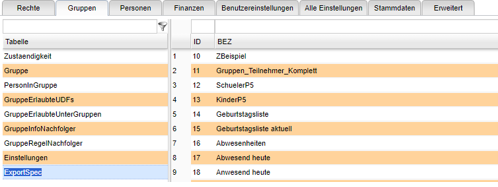
<span style="mso-bidi-font-size: 11.0pt; mso-fareast-font-family: 'Times New Roman'; mso-bidi-font-family: 'Times New Roman';">Hierfür gehen Sie in die Administration -&gt; Gruppen -&gt; ExportSpec</span>

<span style="mso-bidi-font-size: 11.0pt; mso-fareast-font-family: 'Times New Roman'; mso-bidi-font-family: 'Times New Roman'; mso-no-proof: yes;"> </span>

<span style="mso-bidi-font-size: 11.0pt; mso-fareast-font-family: 'Times New Roman'; mso-bidi-font-family: 'Times New Roman';"> </span>

[![grafik.png](https://docs.alpha-np.de/uploads/images/gallery/2025-07/scaled-1680-/mLxgrafik.png)](https://docs.alpha-np.de/uploads/images/gallery/2025-07/mLxgrafik.png)

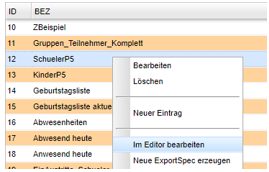
<span style="mso-bidi-font-size: 11.0pt; mso-fareast-font-family: 'Times New Roman'; mso-bidi-font-family: 'Times New Roman';">Im Kontextmenü (rechte Maustaste auf dem gewählten Export) wählen Sie bitte den Punkt „Im Editor bearbeiten“</span><span style="mso-bidi-font-size: 11.0pt; mso-fareast-font-family: 'Times New Roman'; mso-bidi-font-family: 'Times New Roman';"> </span>

[![grafik.png](https://docs.alpha-np.de/uploads/images/gallery/2025-07/scaled-1680-/bXLgrafik.png)](https://docs.alpha-np.de/uploads/images/gallery/2025-07/bXLgrafik.png)

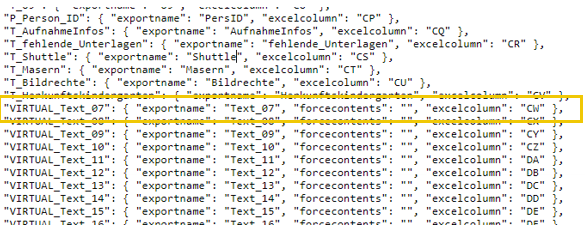
<span style="mso-bidi-font-size: 11.0pt; mso-fareast-font-family: 'Times New Roman'; mso-bidi-font-family: 'Times New Roman';">Navigieren Sie in die Hälfte der vorliegenden json-Datei (ab excelcolumn CQ) – Platzhalter für spätere Textfelder erkennen Sie durch den Namen „VIRTUAL\_Text\_“, Datumfelder – „VIRTUAL\_Datum\_“; JaNein-Felder – „VIRTUAL\_JaNein\_“. Diese Felder können entsprechend angepasst werden. </span>

<span style="mso-bidi-font-size: 11.0pt; mso-fareast-font-family: 'Times New Roman'; mso-bidi-font-family: 'Times New Roman';"> </span>

<span style="mso-bidi-font-size: 11.0pt; mso-fareast-font-family: 'Times New Roman'; mso-bidi-font-family: 'Times New Roman';">Die genauen Änderungen sollen anhand eines Beispiel verdeutlicht werden:</span>

<span style="mso-bidi-font-size: 11.0pt; mso-fareast-font-family: 'Times New Roman'; mso-bidi-font-family: 'Times New Roman';">Es wurde ein Textfeld mit dem Namen „Wahlfach1“ erstellt. Das erste „freie“ Feld im Schüler P5 ist „VIRTUAL\_Text\_07“.</span>

[![grafik.png](https://docs.alpha-np.de/uploads/images/gallery/2025-07/scaled-1680-/JEIgrafik.png)](https://docs.alpha-np.de/uploads/images/gallery/2025-07/JEIgrafik.png)

<span style="mso-bidi-font-size: 11.0pt; mso-fareast-font-family: 'Times New Roman'; mso-bidi-font-family: 'Times New Roman';">Diese Zeile würde man nun anpassen:</span>

[![grafik.png](https://docs.alpha-np.de/uploads/images/gallery/2025-07/scaled-1680-/G3qgrafik.png)](https://docs.alpha-np.de/uploads/images/gallery/2025-07/G3qgrafik.png)

<span style="mso-bidi-font-size: 11.0pt; mso-fareast-font-family: 'Times New Roman'; mso-bidi-font-family: 'Times New Roman'; mso-no-proof: yes;"> </span>

- <span style="mso-bidi-font-size: 11.0pt; line-height: 107%; mso-fareast-font-family: 'Times New Roman'; mso-bidi-font-family: 'Times New Roman';">„VIRTUAL\_Text\_07“ ersetzt man durch „T\_Wahlfach1“ (Beachte „T\_“ muss immer vor den gewählten Namen)</span>
- <span style="mso-bidi-font-size: 11.0pt; line-height: 107%; mso-fareast-font-family: 'Times New Roman'; mso-bidi-font-family: 'Times New Roman';">„exportname“: „Text\_07“ ersetzt man zu „exportname“: „Wahlfach1“</span>
- <span style="mso-bidi-font-size: 11.0pt; line-height: 107%; mso-fareast-font-family: 'Times New Roman'; mso-bidi-font-family: 'Times New Roman';">„forcecontents“: „“ wird gelöscht</span>

<span style="mso-bidi-font-size: 11.0pt; mso-fareast-font-family: 'Times New Roman'; mso-bidi-font-family: 'Times New Roman';"> </span>

<span style="mso-bidi-font-size: 11.0pt; mso-fareast-font-family: 'Times New Roman'; mso-bidi-font-family: 'Times New Roman';">Achten Sie darauf dass Kommas und Leerzeichen entsprechend dem oben angezeigten Format enthalten sind.</span>

<span style="mso-bidi-font-size: 11.0pt; mso-fareast-font-family: 'Times New Roman'; mso-bidi-font-family: 'Times New Roman';"> </span>

<span style="mso-bidi-font-size: 11.0pt; mso-fareast-font-family: 'Times New Roman'; mso-bidi-font-family: 'Times New Roman';">Im Anschluss nur noch „Save“</span>

<span style="mso-bidi-font-size: 11.0pt; mso-fareast-font-family: 'Times New Roman'; mso-bidi-font-family: 'Times New Roman';"> </span>

<span style="mso-bidi-font-size: 11.0pt; mso-fareast-font-family: 'Times New Roman'; mso-bidi-font-family: 'Times New Roman';">Bitte testen Sie die Exporte im Anschluss.</span>

<span style="mso-bidi-font-size: 11.0pt; mso-fareast-font-family: 'Times New Roman'; mso-bidi-font-family: 'Times New Roman';"> </span>

<span style="mso-bidi-font-size: 11.0pt; mso-fareast-font-family: 'Times New Roman'; mso-bidi-font-family: 'Times New Roman';"> </span>

### <span style="mso-fareast-font-family: Calibri; mso-fareast-theme-font: minor-latin;"><span style="mso-list: Ignore;"><span style="font: 7.0pt 'Times New Roman';"> </span></span></span>Anpassen eines UDFs

<span style="mso-bidi-font-size: 11.0pt; mso-fareast-font-family: 'Times New Roman'; mso-bidi-font-family: 'Times New Roman';">Anpassung in UDFs sollten in der Regel nicht mehr vorgenommen werden, wenn Daten bereits eingegeben wurden, da dies zu vermeintlichen Fehlfunktionen führen kann.</span>

<span style="mso-bidi-font-size: 11.0pt; mso-fareast-font-family: 'Times New Roman'; mso-bidi-font-family: 'Times New Roman';">Folgende Einstellungen können aber Problemlos gemacht werden: </span>

- <span style="mso-bidi-font-size: 11.0pt; line-height: 107%; mso-fareast-font-family: 'Times New Roman'; mso-bidi-font-family: 'Times New Roman';">Name (-&gt; Rechte Maustaste -&gt; Feld umbenennen)</span>
- <span style="mso-bidi-font-size: 11.0pt; line-height: 107%; mso-fareast-font-family: 'Times New Roman'; mso-bidi-font-family: 'Times New Roman';">Lernend</span>
- <span style="mso-bidi-font-size: 11.0pt; line-height: 107%; mso-fareast-font-family: 'Times New Roman'; mso-bidi-font-family: 'Times New Roman';">SortIndex</span>

<span style="mso-bidi-font-size: 11.0pt; mso-fareast-font-family: 'Times New Roman'; mso-bidi-font-family: 'Times New Roman';">Bei der Änderung des Namens sollten die Verwendung in Seriendruck mitberücksichtigt werden, desweiteren sollte beachtet werden, dass dabei alle Benutzer aus P!5 in dem Momente abgemeldet werden, so dass es bei Exporten nicht zu Fehlern kommt.</span>

<span style="mso-bidi-font-size: 11.0pt; mso-fareast-font-family: 'Times New Roman'; mso-bidi-font-family: 'Times New Roman';"> </span>

### Löschen/ Deaktivieren von UDFs

<span style="mso-bidi-font-size: 11.0pt; mso-fareast-font-family: 'Times New Roman'; mso-bidi-font-family: 'Times New Roman';">Felder können auch wieder gelöscht werden. In der Regel ist aber eine Deaktivierung sinnvoller. Hiermit ist das Feld weder auf dem Inforeiter noch in der Gruppenverwaltung verfügbar, jedoch bleiben eingetragen Daten erhalten. Bei einer Löschung wird nicht nur das Feld gelöscht sondern auch alle enthaltene Daten. Auch hier muss beachtet werden, ob die entsprechende Felder im SchuelerP5 oder KinderP5 enthalten sind. Falls dem so ist muss dieses Feld im ExportSpec virtualisiert werden.</span>

<span style="mso-bidi-font-size: 11.0pt; mso-fareast-font-family: 'Times New Roman'; mso-bidi-font-family: 'Times New Roman';"> </span>

#### Deaktivierung

<span style="mso-bidi-font-size: 11.0pt; mso-fareast-font-family: 'Times New Roman'; mso-bidi-font-family: 'Times New Roman';">Folgende Schritte sind zu tätigen:</span>

- <span style="mso-bidi-font-size: 11.0pt; line-height: 107%; mso-fareast-font-family: 'Times New Roman'; mso-bidi-font-family: 'Times New Roman';">Gruppenverwaltung -&gt; Gruppe auswählen -&gt; An Gruppe verfügbare Felder</span>
- <span style="mso-bidi-font-size: 11.0pt; line-height: 107%; mso-fareast-font-family: 'Times New Roman'; mso-bidi-font-family: 'Times New Roman';">Kontextmenü -&gt; Bearbeiten</span>
- <span style="mso-bidi-font-size: 11.0pt; line-height: 107%; mso-fareast-font-family: 'Times New Roman'; mso-bidi-font-family: 'Times New Roman';">Haken bei „IstAktiv“ herausnehmen</span>
- <span style="mso-bidi-font-size: 11.0pt; line-height: 107%; mso-fareast-font-family: 'Times New Roman'; mso-bidi-font-family: 'Times New Roman';">SchülerP5/ Kinder P5 rückändern (sollte das vergessen werden, funktionieren die entsprechenden Exporte nicht mehr)</span>

#### Löschung

<span style="mso-bidi-font-size: 11.0pt; mso-fareast-font-family: 'Times New Roman'; mso-bidi-font-family: 'Times New Roman';">Folgende Schritte sind zu tätigen:</span>

- <span style="mso-bidi-font-size: 11.0pt; line-height: 107%; mso-fareast-font-family: 'Times New Roman'; mso-bidi-font-family: 'Times New Roman';">Gruppenverwaltung -&gt; Gruppe auswählen -&gt; An Gruppe verfügbare Felder</span>
- <span style="mso-bidi-font-size: 11.0pt; line-height: 107%; mso-fareast-font-family: 'Times New Roman'; mso-bidi-font-family: 'Times New Roman';">Kontextmenü -&gt; Löschen</span>
- <span style="mso-bidi-font-size: 11.0pt; line-height: 107%; mso-fareast-font-family: 'Times New Roman'; mso-bidi-font-family: 'Times New Roman';">SchülerP5/ Kinder P5 rückändern (sollte das vergessen werden, funktionieren die entsprechenden Exporte nicht mehr)</span>

# Verwalten von Gruppen und Nachfolgegruppen

### Reihenfolge anpassen

<span style="mso-bidi-font-size: 11.0pt; mso-fareast-font-family: 'Times New Roman'; mso-bidi-font-family: 'Times New Roman';">Gruppen können in der Standardreihenfolge (alphabetisch) durch den Sortierschlüssel angepasst werden. Dadruch können ganze Einrichtungen nach unten oder oben verschoben werden, selbstverständlich gilt dies auch für Klassen oder Kinderbetreuungsgruppen, sowie Betriebe und Personengruppen.</span>

<span style="mso-bidi-font-size: 11.0pt; mso-fareast-font-family: 'Times New Roman'; mso-bidi-font-family: 'Times New Roman';">Die Einstellungen gelten für alle Benutzer in P!. Folgendermaßen kann der Sortierschlüssel angepasst werden:</span>

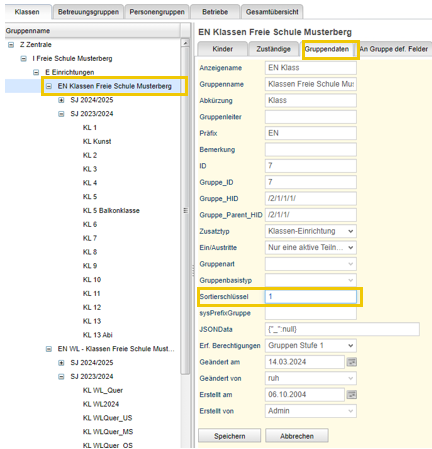
<span style="mso-bidi-font-size: 11.0pt; mso-fareast-font-family: 'Times New Roman'; mso-bidi-font-family: 'Times New Roman';">Sie navigieren über die Gruppenverwaltung zur entsprechenden Einrichtung oder Gruppe. Dort gehen Sie auf den Reiter Gruppendaten:</span><span style="mso-bidi-font-size: 11.0pt; mso-fareast-font-family: 'Times New Roman'; mso-bidi-font-family: 'Times New Roman'; mso-fareast-language: DE; mso-no-proof: yes;"> </span>

[![grafik.png](https://docs.alpha-np.de/uploads/images/gallery/2025-07/scaled-1680-/Wmzgrafik.png)](https://docs.alpha-np.de/uploads/images/gallery/2025-07/Wmzgrafik.png)

<span style="mso-bidi-font-size: 11.0pt; mso-fareast-font-family: 'Times New Roman'; mso-bidi-font-family: 'Times New Roman';">Gehen dort in der Bearbeitungsmodus und passen den Sortierschlüssel an. Gültig sind alle ganzen Zahlen (auch im Minusbereich). Sinnhaft ist es, wenn man – gerade bei vielen Einrichtungen – sich ein entsprechendes Konzept überlegt hat und die Einstellungen dann für alle Gruppen und/ oder Einrichtungen vornimmt, wenn man in der Gesamtübersicht ist. </span>

<span style="mso-bidi-font-size: 11.0pt; mso-fareast-font-family: 'Times New Roman'; mso-bidi-font-family: 'Times New Roman'; mso-no-proof: yes;"> </span><span style="mso-bidi-font-size: 11.0pt; mso-fareast-font-family: 'Times New Roman'; mso-bidi-font-family: 'Times New Roman';">Durch den Aktualisierungsknopf kann die Ansicht neu geladen werden</span>

<span style="mso-bidi-font-size: 11.0pt; mso-fareast-font-family: 'Times New Roman'; mso-bidi-font-family: 'Times New Roman';"> </span>[![grafik.png](https://docs.alpha-np.de/uploads/images/gallery/2025-07/scaled-1680-/XVhgrafik.png)](https://docs.alpha-np.de/uploads/images/gallery/2025-07/XVhgrafik.png)

### Gruppename ändern

<span style="mso-bidi-font-size: 11.0pt; mso-fareast-font-family: 'Times New Roman'; mso-bidi-font-family: 'Times New Roman';">Auch der Gruppenname kann an der gleichen Stelle wie der Sortierungsschlüssel angepasst werden. Bei der Umbenennung von Klassen oder Betreuungsgruppen beachten Sie bitte, die Änderungen auch im zukünftigen Schuljahr vorzunehmen. Die Abkürzungen können maximal 10 Zeichen enthalten.</span>

<span style="mso-bidi-font-size: 11.0pt; mso-fareast-font-family: 'Times New Roman'; mso-bidi-font-family: 'Times New Roman';"> </span>

### Folgegruppen sehen/ ändern

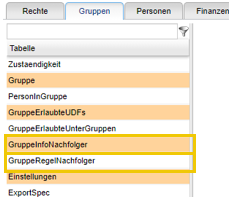
<span style="mso-bidi-font-size: 11.0pt; mso-fareast-font-family: 'Times New Roman'; mso-bidi-font-family: 'Times New Roman';">Folgegruppen werden in der Regel bei Anlage einer Gruppe gleich mit angelegt (Folgegruppe/ Folgejahrgangsstufe/ Folgestufe). Jedoch kann man bei Bedarf diese Einstellungen anpassen. Für diesen Zweck gibt es zwei Tabellen in der Administration im Bereich „Gruppen“: </span>

[![grafik.png](https://docs.alpha-np.de/uploads/images/gallery/2025-07/scaled-1680-/sbWgrafik.png)](https://docs.alpha-np.de/uploads/images/gallery/2025-07/sbWgrafik.png)

#### <span style="mso-fareast-font-family: 'Calibri Light'; mso-fareast-theme-font: major-latin; mso-bidi-font-family: 'Calibri Light'; mso-bidi-theme-font: major-latin;"><span style="mso-list: Ignore;"><span style="font: 7.0pt 'Times New Roman';"> </span></span></span>GruppeRegelNachfolger

<span style="mso-bidi-font-size: 11.0pt; mso-fareast-font-family: 'Times New Roman'; mso-bidi-font-family: 'Times New Roman';">Nach dieser Tabelle werden beim Schuljahreswechsel das nächst höhere Schuljahr mit seinen Gruppen erstellt.</span>

<span style="mso-bidi-font-size: 11.0pt; mso-fareast-font-family: 'Times New Roman'; mso-bidi-font-family: 'Times New Roman';"> </span>

<span style="mso-bidi-font-size: 11.0pt; mso-fareast-font-family: 'Times New Roman'; mso-bidi-font-family: 'Times New Roman';">Hier können nun Folgegruppen, sowie nach wie vielen Stufen ein Gruppenwechsel vorgesehen ist angepasst werden. (Hinweis: Alle Standardklasse haben hier „1“ drin stehen.)</span>

<span style="mso-bidi-font-size: 11.0pt; mso-fareast-font-family: 'Times New Roman'; mso-bidi-font-family: 'Times New Roman';"> </span>

#### GruppeInfoNachfolger

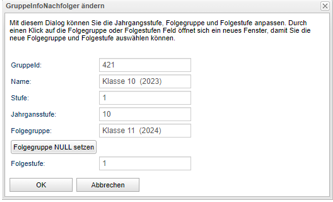
<span style="mso-bidi-font-size: 11.0pt; mso-fareast-font-family: 'Times New Roman'; mso-bidi-font-family: 'Times New Roman';">In der Tabelle GruppeInfoNachfolger kann man die Einstellungen für das nächste Schuljahr anpassen. Änderungen sind grundsätzlich nur im aktuellen Schuljahr sinnvoll. Um Änderungen vorzunehmen gehen Sie mit Rechtsklick auf die entsprechende Gruppe und wählen „Im Dialog bearbeiten“ aus dem Kontextmenü aus</span>

<span style="mso-bidi-font-size: 11.0pt; mso-fareast-font-family: 'Times New Roman'; mso-bidi-font-family: 'Times New Roman';"> </span>

<span style="mso-bidi-font-size: 11.0pt; mso-fareast-font-family: 'Times New Roman'; mso-bidi-font-family: 'Times New Roman';">Bei Klick auf die Folgegruppe öffnet sich die Gruppenauswahl mit den Gruppe für das Folgeschuljahr, wählen Sie hier die gewünschte Gruppe aus. Im Anschluss stellt P! zur Option, die geänderten Einstellungen bei allen betreffenden Schülern vorzunehmen.</span>

<span style="mso-bidi-font-size: 11.0pt; mso-fareast-font-family: 'Times New Roman'; mso-bidi-font-family: 'Times New Roman';"> </span>

[![grafik.png](https://docs.alpha-np.de/uploads/images/gallery/2025-07/scaled-1680-/j3Ngrafik.png)](https://docs.alpha-np.de/uploads/images/gallery/2025-07/j3Ngrafik.png)

<span style="mso-bidi-font-size: 11.0pt; mso-fareast-font-family: 'Times New Roman'; mso-bidi-font-family: 'Times New Roman';"> </span>

<span style="mso-bidi-font-size: 11.0pt; mso-fareast-font-family: 'Times New Roman'; mso-bidi-font-family: 'Times New Roman';"> </span>

<span style="mso-bidi-font-size: 11.0pt; mso-fareast-font-family: 'Times New Roman'; mso-bidi-font-family: 'Times New Roman';"></span>

# Bearbeitung von Look-Up-Tabellen

<span style="mso-bidi-font-size: 11.0pt; mso-fareast-font-family: 'Times New Roman'; mso-bidi-font-family: 'Times New Roman';">Look-Up-Tabellen werden an unterschiedlichen Stellen verwendet und können in der Administration angepasst werden.</span>

<span style="mso-bidi-font-size: 11.0pt; mso-fareast-font-family: 'Times New Roman'; mso-bidi-font-family: 'Times New Roman';"> </span>

<span style="mso-bidi-font-size: 11.0pt; mso-fareast-font-family: 'Times New Roman'; mso-bidi-font-family: 'Times New Roman';">ACHTUNG: Bearbeitung der Bezeichnungen sollte die gleiche Bedeutung haben! LookupVal wird in der Regel für den Übertrag an eine staatliche Schnittstelle benötigt und kann entsprechend der staatlichen Vorgaben angepasst werden</span>

[![grafik.png](https://docs.alpha-np.de/uploads/images/gallery/2025-07/scaled-1680-/LN9grafik.png)](https://docs.alpha-np.de/uploads/images/gallery/2025-07/LN9grafik.png)

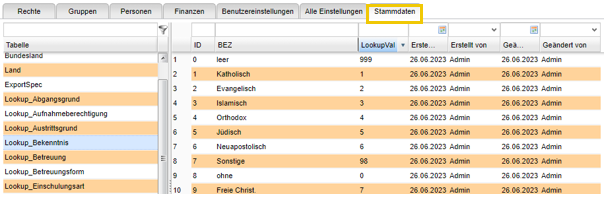
<span style="mso-bidi-font-size: 11.0pt; mso-fareast-font-family: 'Times New Roman'; mso-bidi-font-family: 'Times New Roman';">Um Anpassungen vorzunehmen, navigieren Sie in der Administration über den Reiter „Stammdaten“ auf die entsprechende Lookup-Tabelle (hier: Lookup\_Bekenntnis), mit der rechten Maustaste auf den entsprechenden Eintrag oder mit Doppelklick kommen Sie in den Bearbeitungsmodus und können Bezeichnung und LookupVal anpassen.</span>

# Schnell-Administration

### <span style="mso-bookmark: _Ref184042622;">Datenbanksicherung</span>

<span style="mso-bidi-font-size: 11.0pt; mso-fareast-font-family: 'Times New Roman'; mso-bidi-font-family: 'Times New Roman';">Eine Datenbanksicherung wird standardmäßig bei größeren Bewegungen empfohlen. Mindestens vor einem Schuljahreswechsel sollte diese angestoßen werden. Dies kann jeder Nutzer machen. Die Sicherung wird in dem Exportverzeichnis des entsprechenden Benutzers datenschutzkonform als .zip passwortgeschützt abgelegt und kann nur mit der Unterstützung der Hotline wieder eingebunden werden.</span>

<span style="mso-bidi-font-size: 11.0pt; mso-fareast-font-family: 'Times New Roman'; mso-bidi-font-family: 'Times New Roman';"> </span>

<span style="mso-bidi-font-size: 11.0pt; mso-fareast-font-family: 'Times New Roman'; mso-bidi-font-family: 'Times New Roman';">Folgendermaßen wird die Datenbanksicherung erstellt:</span>

<span style="mso-bidi-font-size: 11.0pt; mso-fareast-font-family: 'Times New Roman'; mso-bidi-font-family: 'Times New Roman';">Im Hilfe-Center (rechts oben beim Benutzer oder links unten) befindet sich die Schnell-Administration. Hier kann im unteren Bereich „Datenbank sichern“<span style="mso-spacerun: yes;"> </span>gewählt werden.</span>

<span style="mso-bidi-font-size: 11.0pt; mso-fareast-font-family: 'Times New Roman'; mso-bidi-font-family: 'Times New Roman';"> </span>

# P!5 HTTPS - Zertifikat

### Prüfung im Browser

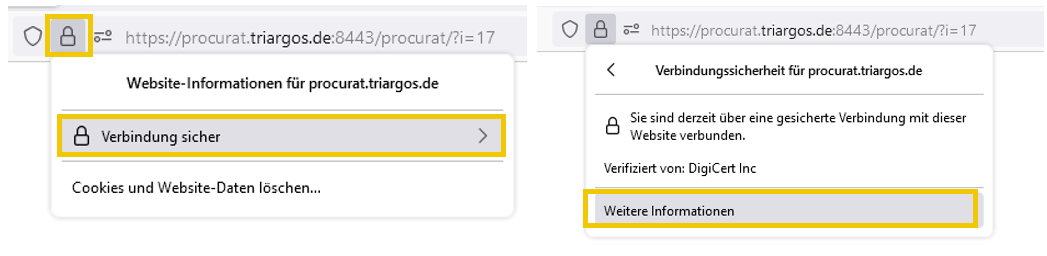
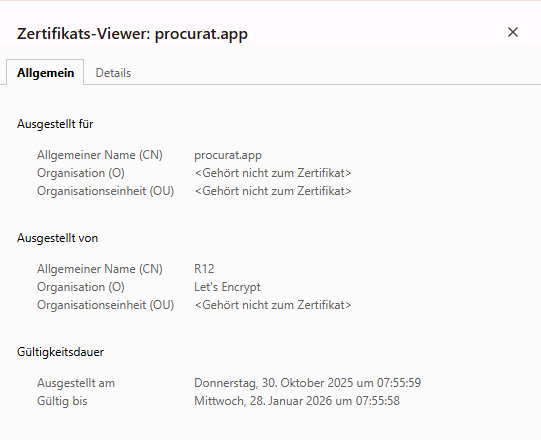
<span style="mso-no-proof: yes;">Sie können über Ihren Browser die Gültigkeit (von – bis) Ihres Zertifikates herausfinden. Dafür gehen Sie auf das Schloss neben der URL und folgen dem gezeigten Weg:</span><span style="mso-fareast-language: DE; mso-no-proof: yes;"> </span>[![image.png](https://docs.alpha-np.de/uploads/images/gallery/2025-11/scaled-1680-/image.png)](https://docs.alpha-np.de/uploads/images/gallery/2025-11/image.png)

Anschließend erhalten Sie in einer Übersicht alle notwendigen Informationen und können das Ende der Gültigkeit in P!5 eintragen, so dass Sie rechtzeitig gewarnt werden.

[![image.png](https://docs.alpha-np.de/uploads/images/gallery/2025-11/scaled-1680-/VPFimage.png)](https://docs.alpha-np.de/uploads/images/gallery/2025-11/VPFimage.png)
### Eintragung des Ablaufdatum in die Schnelladministration in P!5

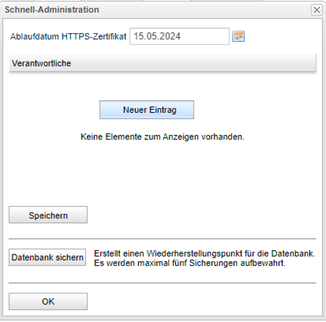
Sie können über die Schnelladministration (-&gt;Hilfe Center -&gt; Schnelladministration) das Ablaufdatum des HTTPS Zertifikates eingegeben werden. In Verbindung mit mindestens einem Verantwortlichen, der entsprechend es in die Wege leitet, dass ein neues Zertifikat bestellt und eingebunden wird, kann P!5 sauber weiter laufen.
![](https://docs.alpha-np.de/uploads/images/gallery/2025-11/embedded-image-qqxrjpaa.png)

Hierfür tragen Sie zunächst das entsprechende Datum ein. Mit der rechten Maustaste im Bereich der Verantwortlichen können sie 1 – x Verantwortliche benennen. Diese würden durch eine Meldung in P!5 nach Anmeldung eine Woche vorher benachrichtigt werden. Hier empfiehlt es sich, Verantwortliche zu wählen die täglich in P!5 arbeiten.

Abschließend speichern Sie bitte noch Ihre Einträge und bestätigen das Fenster mit „ok“. Jede Änderung muss auch gespeichert werden.